
On-prem connectors
Some of the systems your firm runs stay on your own servers. An on-prem connector brings such a system to the AI clients your team already uses, through the same Connector Central workspace, access rules, and activity log as every other connector. The system itself stays where it is, behind your firewall.
How it works
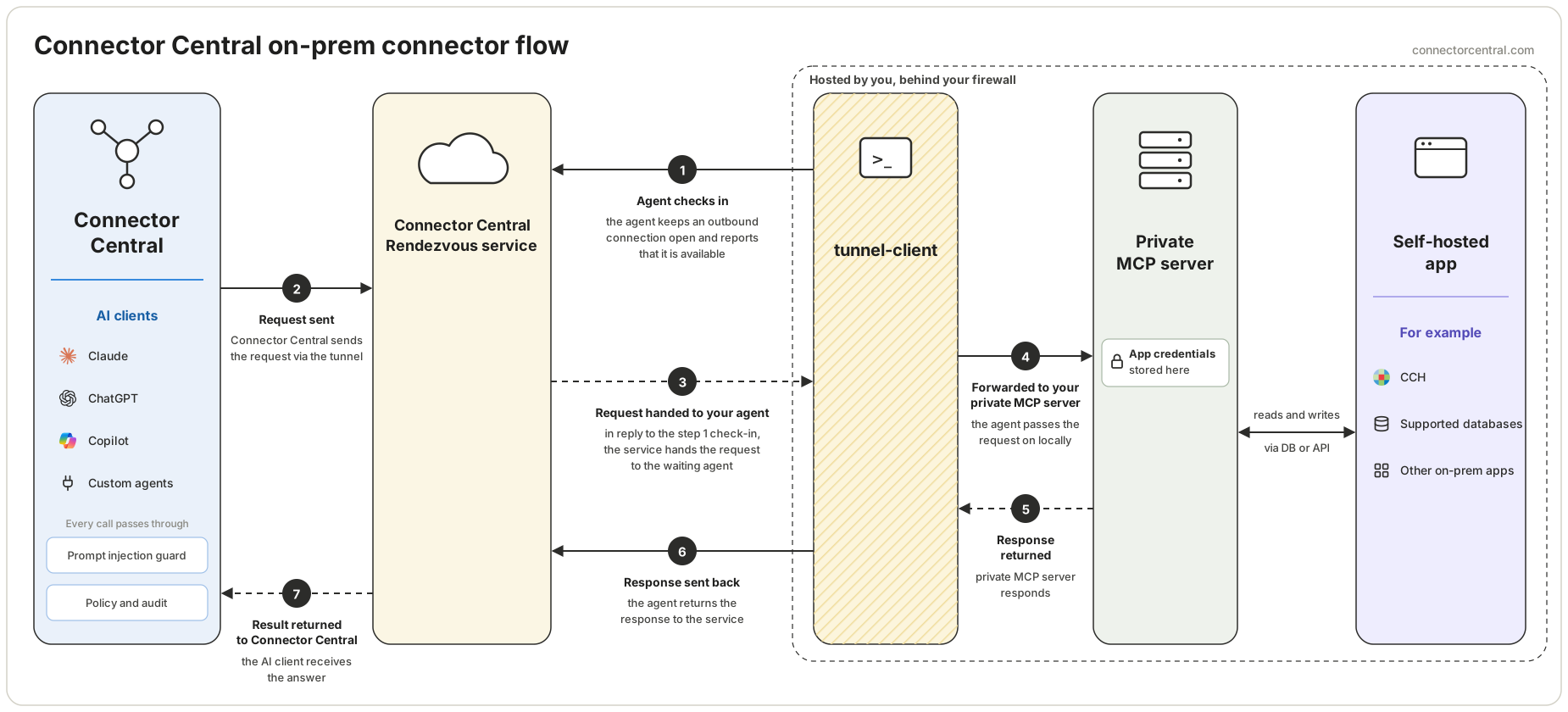
- A small agent runs on a server inside your network. It keeps an outbound connection open to Connector Central and checks in to say it is available.
- Your team uses Claude, ChatGPT, Copilot, or a custom agent with Connector Central exactly as they do today. Connector Central applies the workspace's access rules to every request.
- Connector Central hands an allowed request to your agent over that connection. The agent passes it to the private MCP server running beside it, which reads from or writes to your system.
- The answer travels back the same way to the person's AI client.
If you have used an on-prem sync client for a practice or ledger system, the pattern is familiar: a small service on your server that connects outward, with no changes to your firewall.
What you host
One installer puts two things on a server inside your network:
- The agent, which keeps the outbound connection to Connector Central open.
- The private MCP server, which holds the connection details for your system and carries out each tool against it.
The tool definitions, descriptions, and read, write, and destructive classifications are published and maintained by Connector Central, the same way as for cloud connectors.
Network requirements
The agent connects out to Connector Central over HTTPS on port 443. That is the only path it uses, so it works behind NAT and an outbound proxy and needs no inbound port, public hostname, or VPN.
Where your data and credentials stay
- Credentials for your system stay on your server, inside the private MCP server. AI clients never receive them.
- Tool inputs and results pass through Connector Central to fulfill the request. The activity log records who called which tool, when, and the outcome. It does not store prompts, tool arguments, tool results, or upstream request and response payloads.
Access and activity
An on-prem connector is governed like every other connector. Owners and admins choose who can use it, at which action tier, and for which connected accounts. Connector Central checks access on every call and records the outcome in the activity log.